
Search functionality on encrypted personally identifiable information (PII)
Creating a plaintext keyword index will backfire and defeat the purpose. Learn how to build your inverted encrypted search index

Your IT compliance team will insist that all customer/employee PII details are encrypted in the database. If you are storing Aadhaar numbers, you will be advised to implement Aadhaar Data Vault as described here. But other PII details, such as name, mobile number, gender, address, etc, can be encrypted and stored using asymmetric/symmetric key encryption algorithms.
The challenge is that the search will become more complex once you encrypt the PII data. The simplest solution is to create a custom inverted index with the encrypted search term as below.
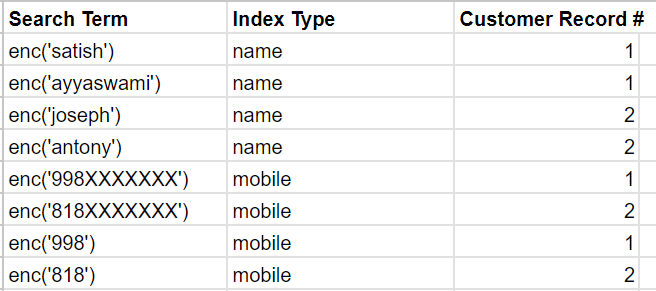
The first column contains the encrypted values of the search term. You can create index records for first, middle, and last names pointing to the same customer record. If you want to support search with, say, the first three characters, add an additional index record with the encrypted value of the search term - see the mobile search example in the table above.
Your search function should first encrypt the data using the same encryption algorithm you used for storing. Once the search term is encrypted, your search function should query the above-inverted index table to retrieve the list of customer record IDs.